Promptions: Dynamic prompting UI that improves gen AI interaction
Anyone who uses AI systems knows the frustration: a prompt is given, the response misses the mark, and the cycle repeats. This trial-and-error loop can feel unpredictable and discouraging. To address this, we are excited to introduce Promptions (prompt + options), a UI framework that helps developers build AI interfaces with more precise user control.
Its simple design makes it easy to integrate into any settingthat relies on added context, including customer support, education, and medicine. Promptions is available under the MIT license on Microsoft Foundry Labs (opens in new tab) and GitHub.
Background
Promptionsbuilds onour research,“Dynamic Prompt Middleware: Contextual Prompt Refinement Controls for Comprehension Tasks.”Thisprojectexaminedhowknowledgeworkersusegenerative AI when their goal isto understand rather thancreate. While much publicdiscussion centers onAI producing textorimages, understanding involves asking AI to explain, clarify, or teach—ataskthat canquickly becomecomplex. Consider a spreadsheet formula: oneuser may want asimple syntaxbreakdown,another adebuggingguide, andanother an explanation suitable forteachingcolleagues.The same formula can requireentirelydifferent explanations depending on the user’s role, expertise, and goals.
A great deal of complexity sits beneath theseseemingly simplerequests.Usersoftenfindthat the waythey phrase a questiondoesn’tmatchthelevel of detail the AIneeds.Clarifying what they really want can require long, carefully wordedprompts that are tiring to produce.And because the connectionbetween natural language and system behaviorisn’t always transparent, it can be difficult to predicthow the AI will interpret agivenrequest.In the end, users spend more timemanaging the interaction itselfthan understanding the material theyhopedto learn.
Identifyinghow users want to guide AI outputs
To explore why thesechallengespersist and how people can better steer AI toward customized results, we conducted two studies with knowledge workers across technical and nontechnical roles. Their experiences highlighted important gaps that guided Promptions’ design.
Ourfirst studyinvolved38 professionalsacrossengineering, research, marketing, and program management. Participants revieweddesign mock-ups thatprovidedstaticprompt-refinementoptions—such aslength, tone, or start with—for shapingAIresponses.
Although thesestaticoptions were helpful, theycouldn’tadapt to thespecific formula, code snippets, or textthe participantwas trying to understand.Participantsalso wanted direct ways tocustomizethetone,detail, orformat of the responsewithouthaving totype instructions.
Why dynamic refinement matters
Thesecond studytestedprototypesin acontrolled experiment.We compared the staticdesignfrom the first study, calledthe“Static Prompt Refinement Control”(Static PRC),against a“Dynamic Prompt Refinement Control” (Dynamic PRC)with features thatrespondedtoparticipants’ feedback.Sixteentechnicalprofessionals familiar with generative AIcompleted six tasks,spanningcode explanation,understanding acomplex topic, andlearning a newskill.Each participant tested both systems, with task assignments balanced to ensure fair comparison.
Comparing Dynamic PRCtoStatic PRCrevealed key insights into howdynamicprompt-refinementoptions change users’sense ofcontrol and exploration andhow those optionshelp themreflecton their understanding.
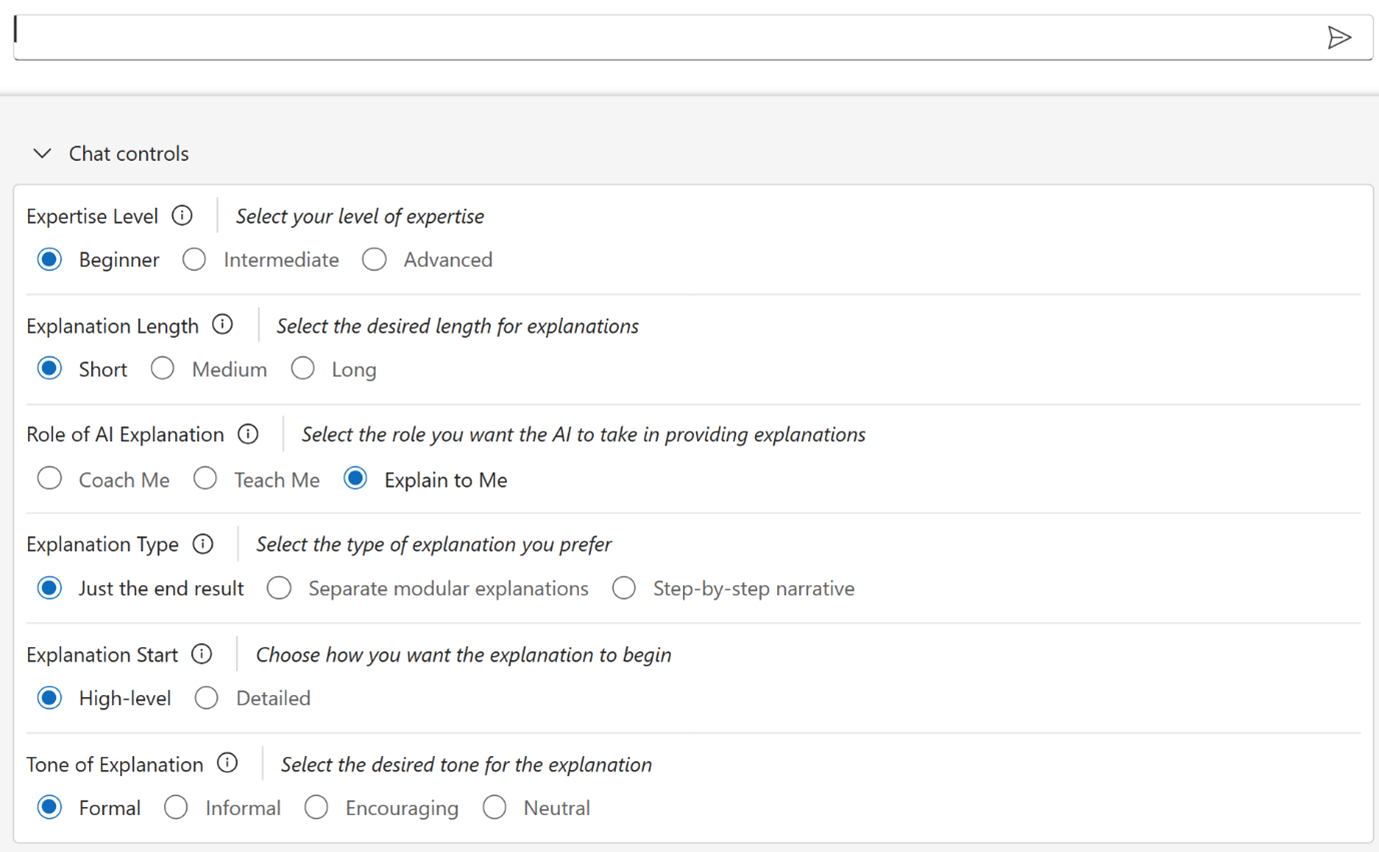
Staticpromptrefinement
Static PRCoffered a set of pre‑selected controls(Figure 1)identifiedin theinitialstudy.We expected these options to be usefulacross manytypes ofexplanation-seekingprompts.
Dynamic prompt refinement
We built the Dynamic PRC system to automatically produce prompt options and refinements based on the user’s input, presenting them in real time so that users could adjust these controls and guide the AI’s responses more precisely (Figure 2).
![Alt text: How users interacted with the Dynamic PRC system. (1) shows a user input prompt of “Explain the formula” [with a long Excel formula] (2) Three rows of options relating to this prompt, Explanation Detail Level, Focus Areas, and Learning Objectives, with several options for each, preselected (3) User has modified the preselected options by clicking Troubleshooting under Learning Objectives (4) AI response of an explanation for the formula based on the selected options (5) Session chat control panel with text box that the user adds](https://www.microsoft.com/en-us/research/wp-content/uploads/2025/12/blog-fig03-dynamicprc-1.png)
Azure AI Foundry Labs
Get a glimpse of potential future directions for AI, with these experimental technologies from Microsoft Research.
Findings
Participants consistently reported that dynamic controls made it easier to express the nuances of their tasks without repeatedly rephrasing their prompts. This reduced the effort of prompt engineering and allowed users to focus more on understanding content than managing the mechanics of phrasing.
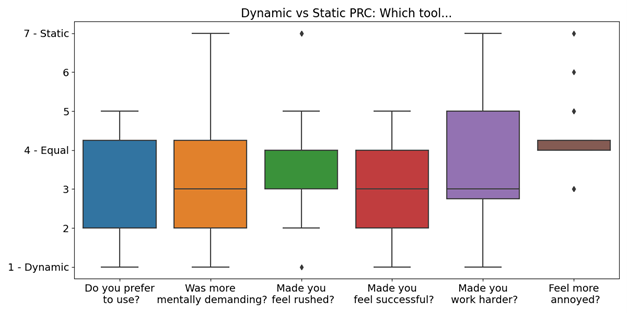
Contextual options prompted users to try refinements they might not have considered on their own. This behavior suggests that Dynamic PRC can broaden how users engage with AI explanations, helping them uncover new ways to approach tasks beyond their initial intent. Beyond exploration, the dynamic controls prompted participants to think more deliberately about their goals. Options like “Learning Objective” and “Response Format” helped them clarify what they needed, whether guidance on applying a concept or step-by-step troubleshooting help.
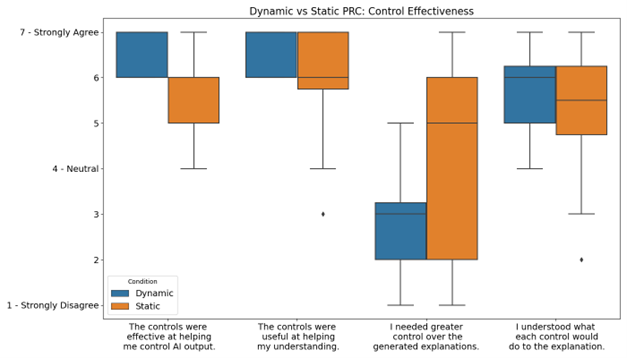
While participants valued Dynamic PRC’s adaptability, they also found it more difficult to interpret. Some struggled to anticipate how a selected option would influence the response, noting that the controls seemed opaque because the effect became clear only after the output appeared.
However,theoverallpositive responsetoDynamic PRCshowed us that Promptionscouldbebroadly useful,leadingus to share itwith the developer community.
Technical design
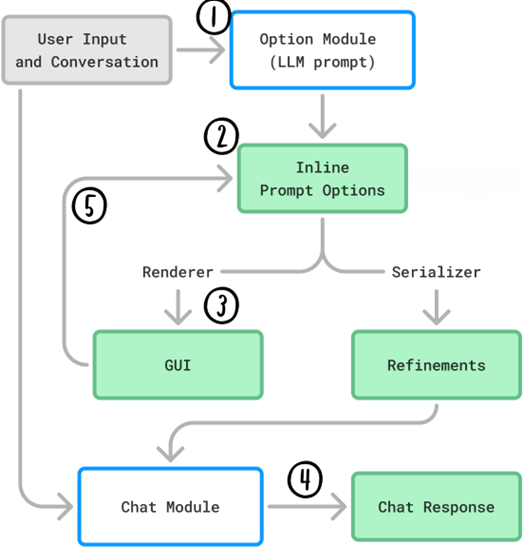
Promptions works as a lightweight middleware layer that sits between the user and the underlying language model (Figure 5). It has two main components:
Option Module. This module reviews the user’s prompt and conversation history, then generates a set of refinement options. These are presented as interactive UI elements (radio buttons, checkboxes, text fields) that directly shape how the AI interprets the prompt.
ChatModule.This moduleproduces theAI’s response basedon the refined prompt.Whena user changes an option,theresponseimmediatelyupdates,making the interaction feel more like anevolvingconversationthana cycle ofrepeated prompts.
Adding Promptions to an application
Promptionseasilyintegratesintoany conversational chat interface.Developers only need to add acomponentto display theoptions and connect it to theAI system.There’sno need to storedatebetween sessions, which keeps implementation simple.TheMicrosoft Foundry Labs (opens in new tab)repositoryincludestwo sample applications,a generic chatbot and an image generator,thatdemonstratethis design in practice.
Promptions is well-suited for interfaces where users need to provide context but don’t want to write it all out. Instead of typing lengthy explanations, they can adjust the controls that guide the AI’s response to match their preferences.
Questions for further exploration
Promptions raises important questions for future research. Key usability challenges include clarifying how dynamic options affect AI output and managing the complexity of multiple controls. Other questions involve balancing immediate adjustments with persistent settings and enabling users to share options collaboratively.
On the technical side, questions focus on generating more effective options, validating and customizing dynamic interfaces, gathering relevant context automatically, and supporting the ability to save and share option sets across sessions.
Thesequestions, along withbroaderconsiderationsofcollaboration, ethics, security, and scalability,areguiding our ongoing work onPromptionsand related systems.
By making Promptions open source, we hope to help developers create smarter, more responsive AI experiences.
Explore Promptions on Microsoft Foundry Labs (opens in new tab)